You need more than a pretty website. You need a tool that works for you 24/7.
Your website should be your top salesperson. It should answer questions, build trust, and make the phone ring. But for most local businesses, it just sits there.
We’re Booked Solid Digital. Our name is a sign. We’ve designed, built, and optimized sites for over 150 local pros. We’ve seen what works. We’ve also seen what quietly kills deals.
This guide is built on that first-hand experience. Use these 20 points to audit your own site. Fix what’s broken. Double down on what works.
Here’s how to turn your local business website into a lead-generating machine for 2026.
The 20-Point Booked Solid Website Formula
- Big CTA Above the Fold
- Customer-Focused Headlines
- Photos of Real Customers
- Visual Reviews
- Perfect Image Quality
- Mobile-Friendly Experience
- One Clear Offer
- Instant Clarity on What You Do
- Clear Differentiators
- Clean Trust Signals
- CTAs on Every Page
- Active Social Links
- Core Web Vitals Passed
- Schema Markup Installed
- Frictionless Forms
- AI-Ready Pages and Content
- Detailed FAQ Sections
- 700+ Words Per Service Page
- Smart Internal Linking
- The “Ugly Website” Advantage
1. Your Main Call to Action Must Be Above the Fold
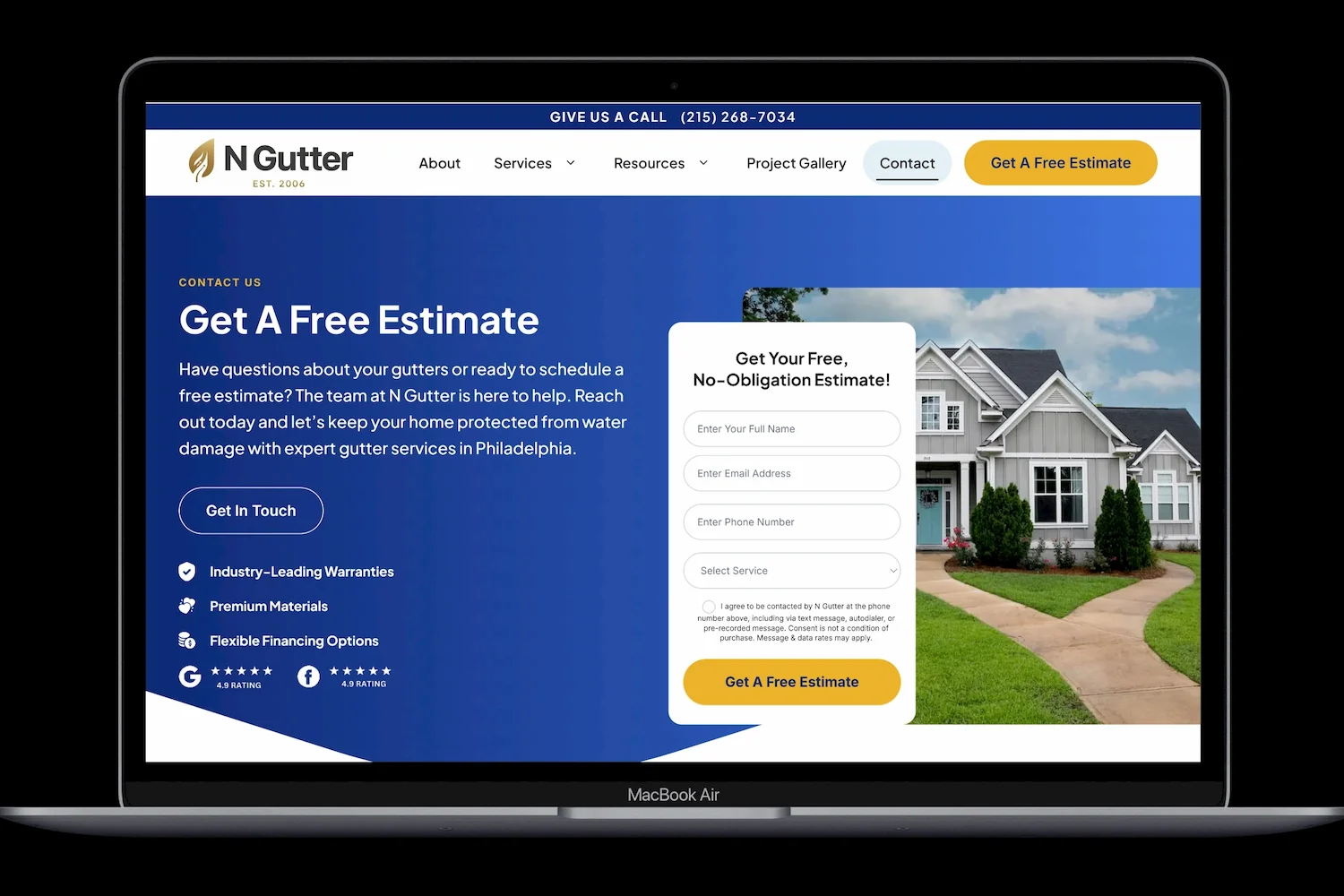
A visitor should never have to hunt for what to do next. Place your primary Call to Action (CTA) in the top third of your homepage. This is prime real estate.
Make it impossible to miss. Use a contrasting color that stands out from your brand palette. Use action-oriented language that creates a small spark of urgency.
Examples:
- “Get a Free Quote”
- “Get a Free Estimate”
- “Book Now”
Don’t bury your lead magnet. Your main offer needs to be the first thing a visitor sees. This gets you more phone calls.
2. Write Headlines About Them, Not You
Your headline has about three seconds to grab attention. Use it to speak directly to your customer’s problem.
Swap generic headlines for customer-focused ones.
- Instead of: “We are a family-owned roofing company.”
- Try: “Stop worrying about that leaky roof. Get a fast, free inspection.”
Focus on the benefit. What’s in it for them? A dry basement? A warm home? Peace of mind? Lead with that.
3. Show Real People, Not Stock Photos
Stock photos of people in hard hats looking at clipboards feel fake. Visitors can spot them a mile away.
Replace them with pictures of your actual team and your actual customers. A photo of a smiling homeowner shaking hands with your installer builds more trust than any stock image ever could.
Pro Tip: If you’re a contractor, include “before and after” photos. This visually proves your skill. It answers the question “Can they do the job?” before it’s even asked.
4. Pull in Your Visual Reviews
Text testimonials are good. Visual reviews are better.
Embed a live feed of your Google or Facebook reviews directly on your homepage. Use a tool to display recent reviews with the star rating and customer name.
Seeing images of real persons builds trust faster than text ever can.
5. Check Every Image for Quality
A stretched or pixelated image makes your whole brand look sloppy.
Before you publish any page, double-check every picture. Make sure they are the correct size and aspect ratio. Nothing should look squished or blurry.
Also, compress your images. Large image files slow down your site. A slow site drives visitors away. Use tools like TinyPNG or ShortPixel to keep your load times fast. Google considers site speed a ranking factor.
6. Make the Mobile Experience Perfect
Over half of your traffic will come from a phone. If your site isn’t perfect on mobile, you are losing leads.
Open your site on your own phone. Can you read the text without pinching the screen? Can you tap the phone number to call? Is the menu easy to use?
If the answer to any of these is no, you need a fix. A non-mobile-friendly site feels broken to most users. They will leave and call a competitor who answers the phone.
7. Focus on One Main Offer
Don’t overwhelm visitors with choices. Hick’s Law says the more options you give someone, the longer it takes them to decide.
On your homepage, focus on one primary offer. What is the main thing you want them to do? Book a consultation? Get a quote?
Save your other services for interior pages. Keep the main path simple and distraction-free.
8. State Your Value in Seconds
New visitors need to understand what you do instantly.
Don’t make them guess. Within the first few seconds, your site should clearly answer:
- Who you are.
- What you do.
- Who you do it for.
Use a simple headline and a supporting sub-headline. Be specific. “Plumber in Austin” is clear. “Premium kitchen and bath remodeling in Austin” is even clearer. Clarity drives calls.
9. Highlight What Makes You Different
List your differentiators. Why should they pick you over the next guy?
Use short, benefit-driven bullet points. Focus on solving their pain points. This matters because it directly answers their unspoken question: “Why should I trust you?”
- Emergency service? “We answer the phone 24/7.”
- Experienced? “Third-generation family business.”
- Fast? “We can be there today.”
Each of these points is a reason to call you instead of someone else. That’s what gets you booked solid.
See how Booked Solid Digital client work uses this to stand out.
10. Keep Your Trust Signals Clean
Trust signals like badges, accreditations, and memberships help. But don’t turn your footer into a junkyard of logos.
Keep them clean and branded. Display your BBB accreditation, your “Google Guaranteed” badge, or your industry association memberships in a neat row. This builds credibility without looking messy.
11. Put CTAs on Every Interior Page
Don’t assume visitors will find their way back to your contact page.
Every service page should have a clear CTA above the fold. And every page should have another CTA at the very bottom. This captures people who read the whole page and are ready to take the next step. It removes friction from the process of hiring you.
12. Link to Your Active Social Profiles
Add links to your social media profiles. But only if you are actually active on them.
A Facebook page with no posts since 2021 hurts your credibility. If you post regularly, show it off. Add social feed widgets to your site to prove you are a real, active business. Active social profiles mean an active company.
13. Pass Core Web Vitals
Google measures your site’s speed and stability with three specific metrics. They call these Core Web Vitals.
You need to pass all three:
- Largest Contentful Paint: Your main content should load in under 2.5 seconds.
- First Input Delay: Your site should respond to clicks in under 100 milliseconds.
- Cumulative Layout Shift: Nothing should jump around while the page loads.
If you fail these, Google penalizes you in search results. More importantly, visitors get frustrated and leave. Run your site through Google’s PageSpeed Insights. Fix what it flags.
14. Install Proper Schema Markup
Schema markup is code that talks directly to search engines. It tells Google exactly what your business does, what services you offer, and where you operate.
Think of it as speaking Google’s native language. With proper schema, search engines understand your site better. They can show rich results with star ratings, pricing, and service menus right in the search results.
LocalBusiness schema, Service schema, and Review schema are non-negotiable for local companies.
15. Make Your Forms Frictionless
Every field in your contact form is a reason for someone to quit.
Audit every form on your site. Ask yourself: Do we really need this field?
Name, phone, email, and a short message box are usually enough. More than that and conversion rates drop.
Also test your forms. Fill them out yourself. Do you get a confirmation? Does the thank-you page load fast? Broken forms kill leads silently.
16. Optimize for AI Overviews
Search is changing. AI tools like Google’s AI Overviews and ChatGPT now answer questions directly. If your content isn’t structured for this, you get left out.
AI SEO for home services is the new and fastest growing layer on top of traditional SEO. It’s how we make sure the following AI tools cite (and recommend!) your business and services:
- Perplexity
- Google AI overviews
- Google Gemini
- ChatGPT
- Microsoft Copilot
- Bing AI
- Claude AI
Here’s how:
- Write in clear, direct Q&A format.
- Use simple language that answers “What,” “Why,” and “How” questions.
- Cite specific data or statistics where possible.
- Build external citations and links pointing to your website pages.
AI pulls answers from sites it trusts. Make your site one of them.
17. Add Detailed FAQ Sections
FAQs are not an afterthought. They are now a primary source for AI answers.
When a customer asks ChatGPT, Perplexity or Google “How much does a new roof cost in Austin?” the answer often comes from a well-structured FAQ on a contractor’s site.
Dedicate a section on every service page to answer the real questions you get on the phone. Use an H2 for “Frequently Asked Questions” and then format each question as an H3. Write a concise, 40-60 word answer right below it. This format gets your business cited directly in voice search and AI results. This leads directly to more phone calls.
18. Write 700+ Words Per Service Page
Google needs content to understand what you do.
Each of your core service pages should have at least 700 words of unique text. This isn’t just for Google. It’s for your customer. Explain the service in detail. Answer common questions. Describe the process and the benefits.
Thin content pages with one paragraph and a form do not rank well. They also don’t convince anyone to hire you. Give each service the attention it deserves.
19. Link Your Pages Together
Create a web of information on your site.
From your roofing page, link to your gutter installation page. From your blog post about maintenance, link to your service page. This is called interlinking.
It helps visitors navigate your site. It also helps Google understand how your pages relate to one another. Good internal linking spreads authority and boosts your SEO. A well-linked site keeps people on your property longer, increasing the chance they pick up the phone.
20. The “Ugly Website” Advantage
Ugly websites often make more money.
We’ve seen it a hundred times. A client comes to us with a site full of animations, sliders, and fancy hover effects. It looks beautiful. It’s very slow loading and annoying to use. It also converts at 0.2%.
We strip it down. Big text. Clear headlines. Obvious buttons. Zero animations. No sliders. Just information and a way to contact us. Conversion rate jumps to 4-5%.
Why? Because cognitive load matters more than pretty.
Every animation, every fancy transition, every auto-playing video forces the visitor’s brain to work harder. Their goal is not to admire your design. Their goal is to answer one question: “Can this business or person solve my problem?”
When you make that answer easy to find, they call. When you distract them with design flourishes, they get confused and leave.
The ugliest converting sites share three traits:
- High contrast between text and background
- Large, obvious buttons with the same text
- No movement or animation
Your website is not an art project. It’s a sales tool to make you more money. Build it like one.
Start Your Website Audit Today
You’ve now got the Booked Solid Website Formula at your fingertips. You don’t need a complete rebuild to start seeing results. Run through this 20-point checklist on your current site. Pick three things to fix this week.
Then grab our full guide and the video walkthrough. We’ll show you exactly how we would implement these strategies for your website and put more money in your pockets.
If you run a local business doing over $500k in annual revenue, contact us today to get your free website audit.